Publishing
Every answer needs a home.
It's your own website.
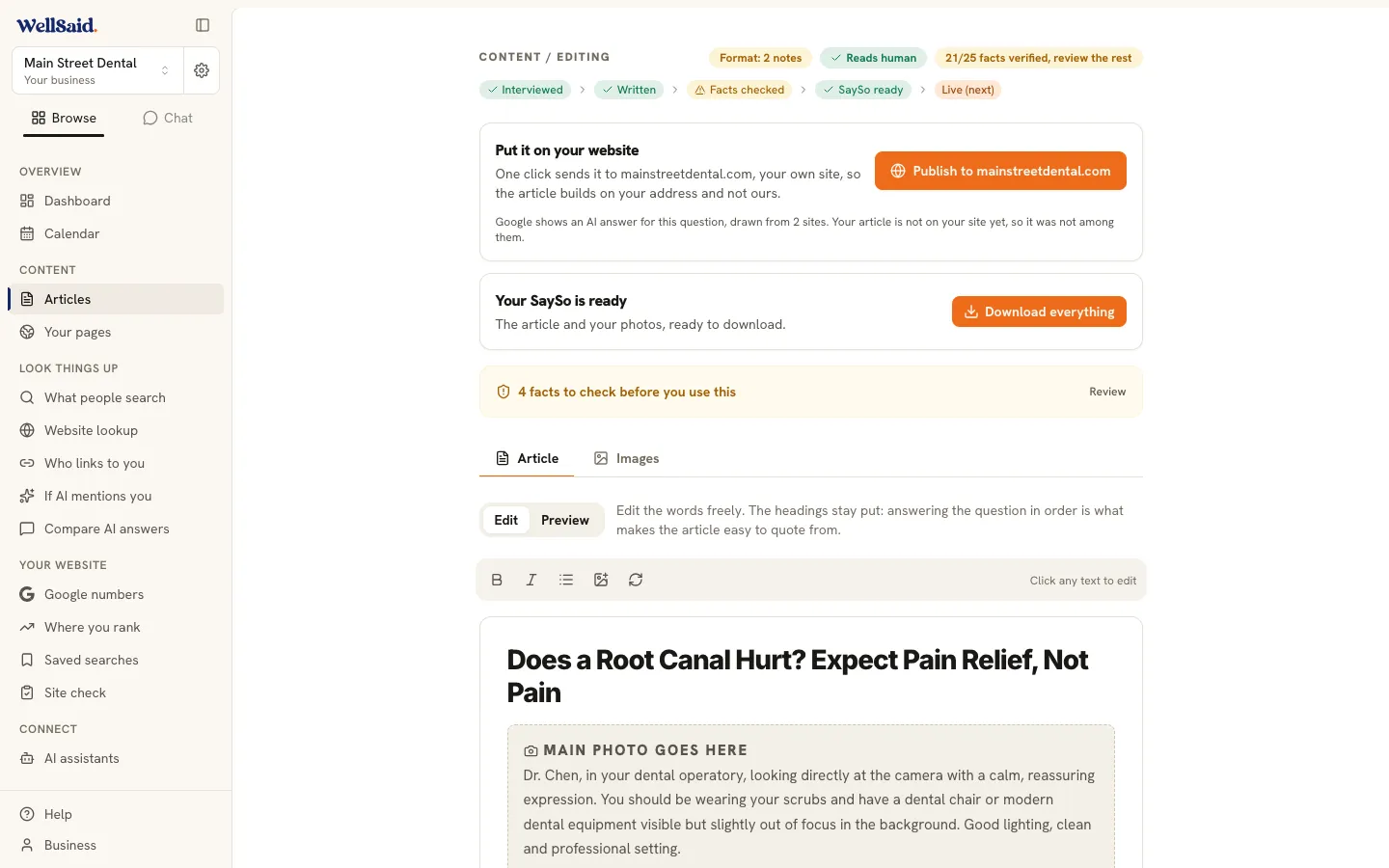
When an article is ready, it goes onto your own website. If your site runs on WordPress, connect it once and every article you approve lands on your blog by itself. If it runs on anything else, you get the finished article in one download, ready to paste in. Nothing goes live until you say so.
Two ways in
Connect it, or paste it in.
Path one
Publish to your own website
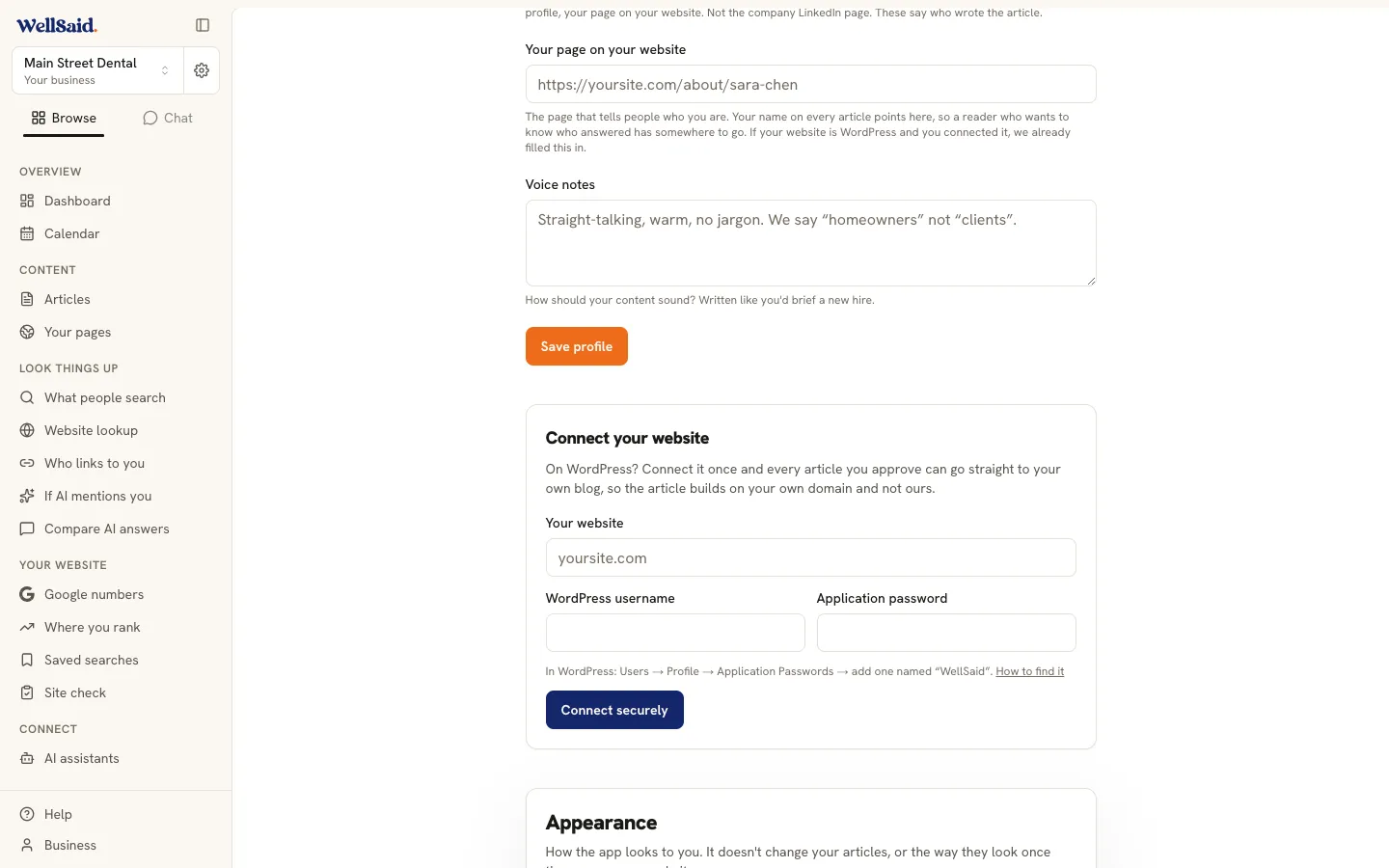
If your site runs on WordPress, connect it once under Business. From then on the publish button reads "Publish to yoursite.com" and every article you approve lands on your own blog, where the Google credit builds for you.
- Your address, your credit. The article lives at your web address, alongside everything else you've built.
- Connect once. Your website, your WordPress username, and an application password you make under Users, then Profile, then Application Passwords.
- Your review, if you want it. Choose whether articles go live right away or land in your drafts for a final look.
- The photos come too. Every picture in the article is placed into your own media library, ready to use again.
- You hold the key. An application password is not your login. It only publishes, and you can delete it in WordPress or press Disconnect here any time.
Path two
Take the file and paste it in
Website on something we can't connect to? Nobody gets turned away. One button hands you the finished article, and adding a post to your own site is something you or your web person already know how to do.
- Works with any website. Squarespace, Wix, Shopify, GoDaddy, anything. The file doesn't care what your site runs on.
- One download, not nine. The article, the photos and the rest arrive together, in one file.
- Or just copy it. If you'd rather not download anything, copy the article straight out of WellSaid and paste it in.
- Ready for your web person. The behind-the-scenes files that help AI read and quote your answer are in there too, already written.
- Connect later, any time. Move to WordPress one day and everything you write from then on publishes itself.
Inside the download
- The article, ready to paste anywhere
- The photos from it, full size
- The finished page for whoever runs your website
- Your photo ideas, with the captions written
- A note explaining what every file is for
Which one is me?
Find your line.
My website runs on WordPress
Connect it once
Every article you approve lands on your own blog, at your own address.
I'm on Squarespace, Wix, Shopify or WordPress.com
Download it
Those builders keep outside tools out. You get the finished article to paste in yourself.
Someone else looks after my website
Send them the file
The download has everything they need, with a plain note explaining each file.
I want a proper website built around all this
Talk to us
It isn't a button in the product. It's a conversation, and we're happy to have it.
The honest part
We can't connect every kind of website.
Squarespace, Wix, Shopify, Webflow, Ghost and the GoDaddy website builder don't let outside tools publish to their blogs. WordPress.com works differently from a regular WordPress site and can't be connected either. None of that is a workaround we're hiding: those doors are shut to everybody, not only to us. If you're on one of them, the finished article comes to you as a download and you paste it in. It takes a couple of minutes, and you're never stuck.
One more thing worth saying plainly: your own website is the only home your answers get. We don't keep a copy on some address of ours, because two copies of the same writing compete with each other and search engines have to guess which one counts. Everything you publish builds up in one place, and it's yours.
Thinking about a proper website?
Some owners arrive with no website at all, and some have one they've been meaning to replace for years. If you want to talk through a simple site built around your answers, we're happy to. It starts with an email, not a signup.
Common questions
What owners ask before they connect.
What do I need to connect my WordPress site?
Three things, and about two minutes.
Your website address, your WordPress username, and an application password. You make the password inside WordPress under Users, then Profile, then Application Passwords. Your login there needs to be an Editor or an Administrator. Your site also needs to run on https, which almost every site does now.
Is it safe to let WellSaid into my website?
An application password is not your login.
It's a separate key you create yourself, it only lets us post articles, and it can never be used to sign in as you. You can delete it inside WordPress whenever you like, or press Disconnect in WellSaid. We check the connection the moment you set it up, and there's a Test it button any time you want reassurance.
Can anything go live without me?
No. Publishing always starts with your click.
Nothing leaves WellSaid until you press the button. If you'd rather have one more look on your own site first, switch the setting to land every article in your WordPress drafts instead. Then it waits there until you publish it yourself.
I'm on Squarespace, Wix or Shopify. Am I stuck?
Not at all. You get the file instead.
Those builders don't let outside tools publish to their blogs, so nobody can connect them, us included. Instead, one button hands you the finished article in a single download, and there's a copy button if you'd rather paste it straight in. Adding a post to your own site is something you or your web person already know how to do. If you ever move to WordPress, connect it and everything you write from then on publishes itself.
What's actually in the download?
Everything one interview made, in one file.
The article written out plainly, the photos from it, your photo ideas with the captions already written, and the finished page for whoever looks after your website. There's a short note at the top of it explaining what each file is for, in plain English. Nothing in there needs special software.
Do I need a website at all?
You need somewhere to put the answer.
WellSaid writes the article either way, and you can download it the minute it's finished. But an answer only works for you once it's live somewhere your customers can find it, on an address that's yours. Most owners already have a site. If you don't, one is worth having, and we're happy to talk it through.
Ready to give your answers a home?
Write one, then put it on your own website, where the credit builds for you.
From $40 a month. Cancel any time.